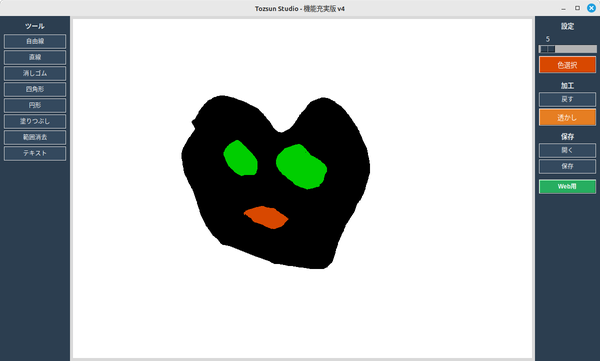
import tkinter as tk
from tkinter import colorchooser, filedialog, messagebox, simpledialog
from PIL import Image, ImageDraw, ImageFont, ImageTk
import os

class TozsunStudio:
    def __init__(self, root):
        self.root = root
        self.root.title("Tozsun Studio - 機能充実版 v4")
        self.canvas_width = 900
        self.canvas_height = 650
        self.root.geometry(f"{self.canvas_width + 300}x{self.canvas_height + 40}")

        self.color = "black"
        self.bg_color = "white"
        self.brush_size = 5
        self.tool = "pen"
        self.start_x = None
        self.start_y = None
        self.image_area = None

        self.history = []
        self.max_history = 20

        self.image = Image.new("RGB", (self.canvas_width, self.canvas_height), self.bg_color)
        self.draw = ImageDraw.Draw(self.image)
        self.tk_image_ref = None
        self.font_path = self.find_japanese_font()

        self.setup_ui()
        self.save_state()
        self.redraw_canvas()

    def find_japanese_font(self):
        candidates = [
            "/usr/share/fonts/opentype/noto/NotoSansCJK-Regular.ttc",
            "/usr/share/fonts/truetype/noto/NotoSansCJK-Regular.ttc",
            "/usr/share/fonts/truetype/fonts-japanese-gothic.ttf"
        ]
        for path in candidates:
            if os.path.exists(path): return path
        return None

    def setup_ui(self):
        self.btn_style = {"bg": "#34495e", "fg": "white", "relief": "flat", "font": ("Arial", 9)}

        # --- 左サイドバー (ツール: 幅140) ---
        left_bar = tk.Frame(self.root, width=140, bg="#2c3e50")
        left_bar.pack(side="left", fill="y")
        left_bar.pack_propagate(0)

        tk.Label(left_bar, text="ツール", bg="#2c3e50", fg="#ecf0f1", font=("Arial", 10, "bold")).pack(pady=(10, 5))
        tools = [
            ("自由線", "pen"), ("直線", "line"), ("消しゴム", "eraser"),
            ("四角形", "rect"), ("円形", "oval"), ("塗りつぶし", "fill"),
            ("範囲消去", "select_delete"), ("テキスト", "text")
        ]
        for text, tool_name in tools:
            btn = tk.Button(left_bar, text=text, **self.btn_style, command=lambda t=tool_name: self.set_tool(t))
            btn.pack(fill="x", padx=8, pady=2)

        # --- 右サイドバー (設定・保存: 幅130) ---
        right_bar = tk.Frame(self.root, width=130, bg="#2c3e50")
        right_bar.pack(side="right", fill="y")
        right_bar.pack_propagate(0)

        tk.Label(right_bar, text="設定", bg="#2c3e50", fg="#ecf0f1", font=("Arial", 10, "bold")).pack(pady=(10, 2))
        self.size_slider = tk.Scale(right_bar, from_=1, to=100, orient="horizontal", bg="#2c3e50", fg="white", highlightthickness=0)
        self.size_slider.set(self.brush_size)
        self.size_slider.pack(padx=5, fill="x")

        self.color_btn = tk.Button(right_bar, text="色選択", bg=self.color, fg="white", command=self.choose_color)
        self.color_btn.pack(pady=5, padx=8, fill="x")

        tk.Label(right_bar, text="加工", bg="#2c3e50", fg="#ecf0f1", font=("Arial", 10, "bold")).pack(pady=(10, 2))
        self.undo_btn = tk.Button(right_bar, text="戻す", **self.btn_style, command=self.undo_state, state="disabled")
        self.undo_btn.pack(fill="x", padx=8, pady=2)
        tk.Button(right_bar, text="透かし", bg="#e67e22", fg="white", command=self.add_watermark).pack(fill="x", padx=8, pady=2)

        tk.Label(right_bar, text="保存", bg="#2c3e50", fg="#ecf0f1", font=("Arial", 10, "bold")).pack(pady=(10, 2))
        tk.Button(right_bar, text="開く", **self.btn_style, command=self.open_image).pack(fill="x", padx=8, pady=2)
        tk.Button(right_bar, text="保存", **self.btn_style, command=self.save_file).pack(fill="x", padx=8, pady=2)
        tk.Button(right_bar, text="Web用", bg="#27ae60", fg="white", font=("Arial", 9, "bold"), command=lambda: self.export_for_web(600)).pack(fill="x", padx=8, pady=10)

        # --- 中央キャンバス ---
        self.canvas = tk.Canvas(self.root, width=self.canvas_width, height=self.canvas_height, bg=self.bg_color, cursor="cross")
        self.canvas.pack(side="left", expand=True, fill="both", padx=5, pady=5)

        self.canvas.bind("<Button-1>", self.on_press)
        self.canvas.bind("<B1-Motion>", self.on_move)
        self.canvas.bind("<ButtonRelease-1>", self.on_release)

    def set_tool(self, tool): self.tool = tool

    def choose_color(self):
        color = colorchooser.askcolor(color=self.color)[1]
        if color:
            self.color = color
            self.color_btn.config(bg=self.color)

    def save_state(self):
        self.history.append(self.image.copy())
        if len(self.history) > self.max_history: self.history.pop(0)
        self.undo_btn.config(state="normal")

    def undo_state(self):
        if len(self.history) > 1:
            self.history.pop()
            self.image = self.history[-1].copy()
            self.draw = ImageDraw.Draw(self.image)
            self.redraw_canvas()
        if len(self.history) <= 1: self.undo_btn.config(state="disabled")

    def redraw_canvas(self):
        self.canvas.delete("all")
        self.tk_image_ref = ImageTk.PhotoImage(self.image)
        self.canvas.create_image(0, 0, image=self.tk_image_ref, anchor="nw")
        if self.image_area:
            self.canvas.create_rectangle(self.image_area[0], self.image_area[1], self.image_area[2]-1, self.image_area[3]-1, outline="#cccccc", width=1, tags="border")

    def on_press(self, event):
        self.start_x, self.start_y = event.x, event.y
        self.brush_size = self.size_slider.get()

        # --- 塗りつぶし機能の改善版 ---
        if self.tool == "fill":
            # 座標が画像範囲内かチェック
            if 0 <= event.x < self.canvas_width and 0 <= event.y < self.canvas_height:
                try:
                    # クリックした位置の現在の色を取得
                    pixel = self.image.getpixel((event.x, event.y))

                    # 現在選択されている色(self.color)をPillowで使える形式に
                    # floodfillはRGBのタプルを好むため変換を試みる
                    fill_color = self.root.winfo_rgb(self.color) # (65535, 65535, 65535) のような16bit形式
                    fill_color = (fill_color[0]//256, fill_color[1]//256, fill_color[2]//256) # 8bit(255)形式に変換

                    # すでに同じ色なら処理しない(無限ループ防止)
                    if pixel != fill_color:
                        ImageDraw.floodfill(self.image, xy=(event.x, event.y), value=fill_color)
                        self.redraw_canvas()
                        self.save_state()
                except Exception as e:
                    print(f"塗りつぶしエラー: {e}")
        # -----------------------------

        elif self.tool == "text":
            text = simpledialog.askstring("テキスト", "文字を入力:")
            if text: self.add_text_to_canvas(event.x, event.y, text)
    def on_move(self, event):
        draw_color = self.bg_color if self.tool == "eraser" else self.color
        if self.tool in ["pen", "eraser"]:
            self.draw.line([self.start_x, self.start_y, event.x, event.y], fill=draw_color, width=self.brush_size)
            self.start_x, self.start_y = event.x, event.y
            self.redraw_canvas()
        elif self.tool in ["line", "rect", "oval", "select_delete"]:
            self.redraw_canvas()
            # プレビュー
            if self.tool == "line":
                self.canvas.create_line(self.start_x, self.start_y, event.x, event.y, fill=self.color, width=self.brush_size)
            elif self.tool == "rect":
                self.canvas.create_rectangle(self.start_x, self.start_y, event.x, event.y, outline=self.color, width=self.brush_size)
            elif self.tool == "oval":
                self.canvas.create_oval(self.start_x, self.start_y, event.x, event.y, outline=self.color, width=self.brush_size)
            elif self.tool == "select_delete":
                # 削除範囲を点線で表示
                self.canvas.create_rectangle(self.start_x, self.start_y, event.x, event.y, outline="red", dash=(4, 4))

    def on_release(self, event):
        if self.tool == "line":
            self.draw.line([self.start_x, self.start_y, event.x, event.y], fill=self.color, width=self.brush_size)
        elif self.tool == "rect":
            self.draw.rectangle([self.start_x, self.start_y, event.x, event.y], outline=self.color, width=self.brush_size)
        elif self.tool == "oval":
            self.draw.ellipse([self.start_x, self.start_y, event.x, event.y], outline=self.color, width=self.brush_size)
        elif self.tool == "select_delete":
            # 指定された範囲を背景色(白)で塗りつぶして消去
            self.draw.rectangle([self.start_x, self.start_y, event.x, event.y], fill=self.bg_color, outline=self.bg_color)

        if self.tool not in ["pen", "eraser", "fill", "text"]:
            self.redraw_canvas(); self.save_state()

    def add_text_to_canvas(self, x, y, text):
        try: font = ImageFont.truetype(self.font_path, self.size_slider.get())
        except: font = None
        self.draw.text((x, y), text, font=font, fill=self.color)
        self.redraw_canvas(); self.save_state()

    def add_watermark(self):
        if not self.image_area: return
        text = "© tozsun.com"
        img_h = self.image_area[3] - self.image_area[1]
        f_size = max(12, int(img_h * 0.04))
        try: font = ImageFont.truetype(self.font_path, f_size)
        except: font = None
        tw = len(text) * (f_size * 0.6)
        self.draw.text((self.image_area[2] - tw - 10, self.image_area[3] - f_size - 10), text, font=font, fill=(180, 180, 180))
        self.redraw_canvas(); self.save_state()

    def export_for_web(self, target_width):
        if not self.image_area: return
        file_path = filedialog.asksaveasfilename(defaultextension=".jpg", filetypes=[("JPEG", "*.jpg")])
        if file_path:
            crop_img = self.image.crop(self.image_area)
            w_percent = (target_width / float(crop_img.size[0]))
            h_size = int((float(crop_img.size[1]) * float(w_percent)))
            web_img = crop_img.resize((target_width, h_size), Image.LANCZOS)
            web_img.save(file_path, "JPEG", quality=85, optimize=True)
            messagebox.showinfo("成功", f"Web用に出力完了")

    def open_image(self):
        f_types = [("Images", "*.png *.jpg *.jpeg *.JPG *.PNG"), ("All", "*.*")]
        path = filedialog.askopenfilename(filetypes=f_types)
        if path:
            opened = Image.open(path).convert("RGB")
            iw, ih = opened.size
            ratio = min(self.canvas_width / iw, self.canvas_height / ih)
            nw, nh = int(iw * ratio), int(ih * ratio)
            resized = opened.resize((nw, nh), Image.LANCZOS)
            self.image = Image.new("RGB", (self.canvas_width, self.canvas_height), self.bg_color)
            ox, oy = (self.canvas_width - nw) // 2, (self.canvas_height - nh) // 2
            self.image.paste(resized, (ox, oy))
            self.image_area = (ox, oy, ox + nw, oy + nh)
            self.draw = ImageDraw.Draw(self.image)
            self.redraw_canvas(); self.save_state()

    def clear_canvas(self):
        if messagebox.askyesno("確認", "全消去しますか?"):
            self.image = Image.new("RGB", (self.canvas_width, self.canvas_height), self.bg_color)
            self.draw = ImageDraw.Draw(self.image)
            self.image_area = None
            self.redraw_canvas(); self.save_state()

    def save_file(self):
        path = filedialog.asksaveasfilename(defaultextension=".png")
        if path:
            save_img = self.image.crop(self.image_area) if self.image_area else self.image
            save_img.save(path)
            messagebox.showinfo("保存", "保存しました。")

if __name__ == "__main__":
    root = tk.Tk()
    app = TozsunStudio(root)
    root.mainloop()
|